Core Fields: Performance Standard
The fields available for the Performance Standard module, and what each one is for
Contents
- 1. Introduction & Context
- 2. Key Features & Functions
- 3. Requirements
- 4. Step-by-Step Guide
- 5. Common Issues & Troubleshooting
- 6. Related Articles
1. Introduction & Context
This article lists the fields available for the Performance Standard module and what each one is for, and shows how to choose which fields appear as columns in the Performance Standard list view.
Who is it for? This is configured by Clew Admins in Admin Settings, under Custom Types > Performance Standard.
What does it impact? These settings control what your team sees and can enter on Performance Standard records, not the underlying data itself.
2. Key Features & Functions
- Field coverage: covering ownership & assignment, standard description & classification, document & reference management, dates & scheduling, and record & system fields, listed in full in Section 4.
- Default list view columns: out of the box, the Performance Standard list view shows Type, ID #, Title, Register, and Review Date.
3. Requirements
- Clew Admin access, to open Admin Settings and Custom Types > Performance Standard.
- The Performance Standard module must already be enabled in Clew.
4. Step-by-Step Guide
Performance Standard: Core Field Visibility
- Go to Admin Settings and open Custom Types.
- Select Performance Standard.
- Scroll to Core Field Settings. Use the search box to find a specific field if the list is long.
- Update fields individually using the eye icons, or select several rows and use Mass Edit. See Core Fields: Overview for how these controls work.
By default, the Performance Standard list view's Selected Fields include Type, ID #, Title, Register, and Review Date.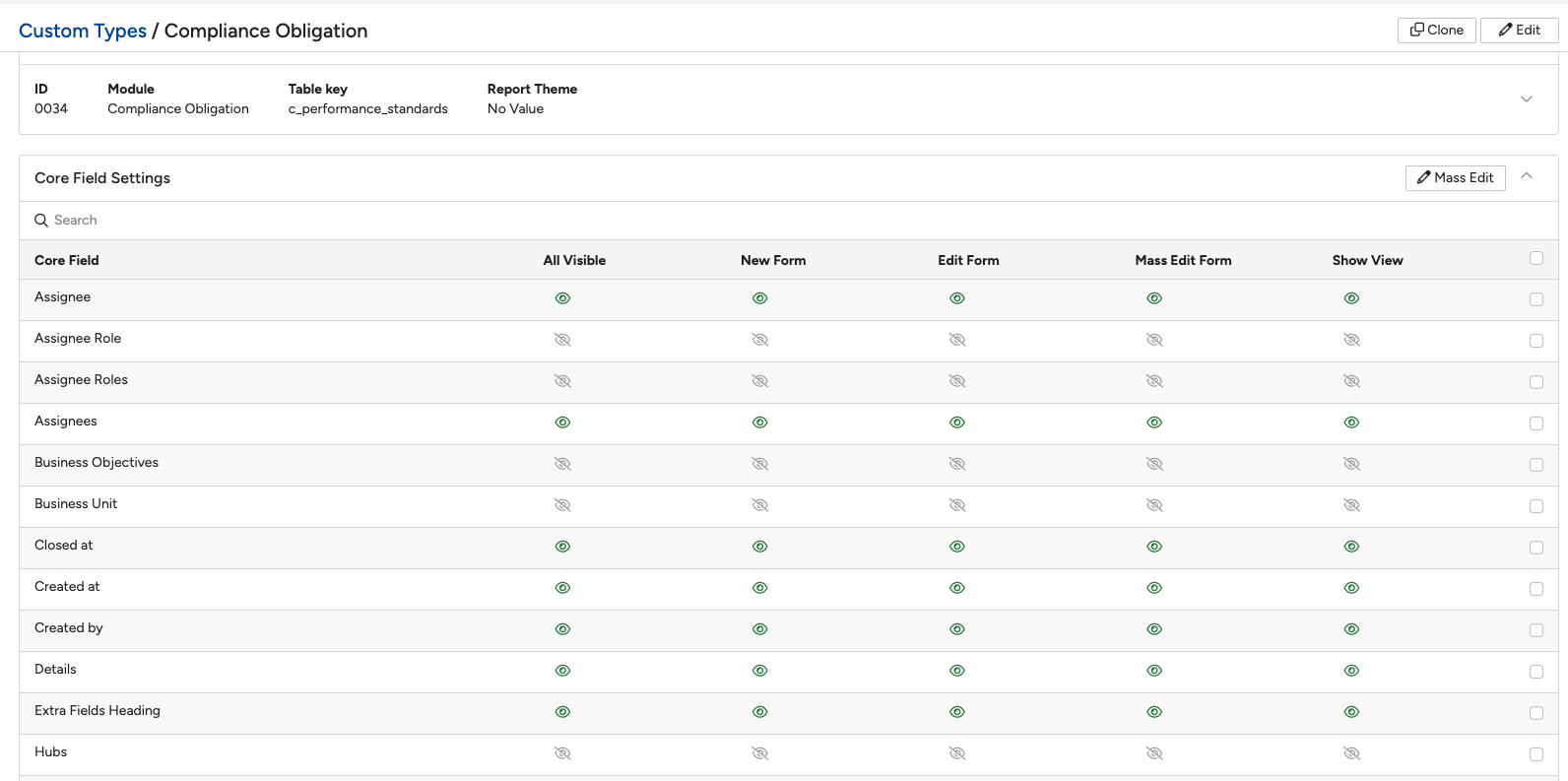
Performance Standard: Field Reference
The fields available for the Performance Standard module, grouped by what they're used for. For how to control where each one appears (New Form, Edit Form, Mass Edit Form, Show View), see Core Fields: Overview.
Ownership & Assignment
| Field | What it's for |
| Owner | The person who owns the performance standard. |
| Owner Role | The role the Owner holds. |
| Assignee | The person the record is currently assigned to. |
| Assignees | Everyone currently assigned to the record, where more than one person can be assigned. |
| Assignee Role | The role the assignee holds. |
| Assignee Roles | The roles of everyone assigned, where more than one person can be assigned. |
Standard Description & Classification
| Field | What it's for |
| Details | A written description of the performance standard. |
| Business Objectives | The organisational objective(s) that this standard relates to. |
| Rating | A rating assigned to the standard, for example reflecting a compliance or performance level. |
| Compliance Status | The current compliance status of the standard, for example Compliant, Non-Compliant, or In Progress. |
| Risk | The risk record this standard is linked to or intended to mitigate. |
| Obligation Type | The type of obligation this standard represents. |
| Obligation Source | The source of the obligation, for example a regulator, law, or internal policy. |
| Rollout Scope | The scope across which this standard is being rolled out. |
| Audience of Document | The intended audience for the document. |
| Scope of Document | The scope covered by the document. |
Document & Reference Management
| Field | What it's for |
| External ID | An identifier for this standard from an external system. |
| External Source | The external source or origin of this standard, for example a regulatory body or external framework. |
| Available Languages | The language(s) the document is available in. |
| Related Obligations | Other obligations related to this standard. |
| Related Documents | Other documents related to this standard. |
| Previous Document Tracker ID | A reference ID carried over from a previous document tracking system. |
| Notes from Corporate Compliance | Notes added by the Corporate Compliance team. |
Dates & Scheduling
| Field | What it's for |
| Review Date | The date the standard is scheduled to be reviewed. |
| Original Review Date | The review date originally set, before any extension. |
| Effective Date | The date the standard takes effect. |
| Due Date for Local Implementation | The date by which the standard must be implemented locally. |
| Date for Next Cycle Review | The date the standard is due for its next review cycle. |
| Closed at | The date and time the record was closed. |
| Frequency | How often the standard is reviewed or reassessed. |
Record & System Fields
| Field | What it's for |
| Type | The record type classification, distinguishing this custom type (Performance Standard) within its module. |
| ID # | The unique identifier number automatically assigned to the record. |
| Title | The short name or title given to the standard. |
| Status | The record's current position in its workflow, for example Draft, Open, or Closed. |
| Register | The register the standard belongs to. |
| Location | The physical or organisational location the standard relates to. |
| Created at | The date and time the record was first created. |
| Updated at | The date and time the record was last updated. |
| Created by | The user who created the record. |
| UUID | A unique identifier automatically generated for the record, in addition to the sequential ID #. |
| Original | Flags whether this is the original version of the record, as distinct from a re-issued or amended one. |
5. Common Issues & Troubleshooting
These issues apply to Performance Standard the same way they do to every module. See Core Fields: Overview for the general troubleshooting table and best practices.
| Issue | Likely Cause | Solution |
| A Performance Standard field doesn't appear on a form or Show View | That specific column is switched off for the field in Performance Standard's Core Field Settings | Open Custom Types > Performance Standard > Core Field Settings and switch on the relevant column for that field |
| A field isn't listed under Performance Standard's Available Fields or Core Field Settings at all | The field has not been enabled for your organisation | Raise a request with Clew support to have the field enabled for Performance Standard |
- Core Fields: Overview
- Core Fields: Risk
- Core Fields: Incidents
- Core Fields: Hazards
- Core Fields: Action
- Core Fields: Assurance (Audit Report)
- Core Fields: Audit
- Core Fields: Business Objective
- Core Fields: Change Request (Feedback)
- Core Fields: Control
- Core Fields: Library Control
- Core Fields: Learning (Declaration)
- Core Fields: Standard
- Core Fields: Measurement
Was this article helpful?
That’s Great!
Thank you for your feedback
Sorry! We couldn't be helpful
Thank you for your feedback
Feedback sent
We appreciate your effort and will try to fix the article