Indicator Outcomes
How to create indicator outcomes and assign them to indicator thresholds
Contents
- 1. Introduction & Context
- 2. Key Features & Functions
- 3. Requirements
- 4. Step-by-Step Guide
- 5. Common Issues & Troubleshooting
- 6. Related Articles
1. Introduction & Context
Indicator outcomes define the results of indicator responses through thresholds, giving each response a clear, colour-coded status such as OK, Attention, or Issue. This article explains how to create outcomes and assign them to indicator thresholds so results are easy to recognise at a glance.
Who is it for? Administrators who configure indicators and want to control how indicator results are classified and displayed.
What does it impact? Outcomes are applied to indicator thresholds. Once assigned, the outcome determines the state(Title), colour, and icon shown for an indicator when its response falls within that threshold.
2. Key Features & Functions
- Custom outcome levels: define as many outcome levels as you need, for example OK, Attention, and Issue.
- Colour and icon coding: choose a colour and icon for each outcome so indicator results are easy to recognise.
- Threshold assignment: assign an outcome to each indicator threshold, so responses are classified automatically.
3. Requirements
- The Indicators module must be enabled to set up indicator outcomes.
- Administrator access to the Admin area, where outcomes are created.
4. Step-by-Step Guide
Creating an Indicator Outcome
- To create an outcome, go to Admin, then Outcomes.

Opening the Outcomes page from the Admin menu.
- Define the levels of your outcomes as required. In this example the values are OK, Attention, and Issue. Select your preferred colour and icon for each outcome, which will help you recognise how an indicator has been marked.
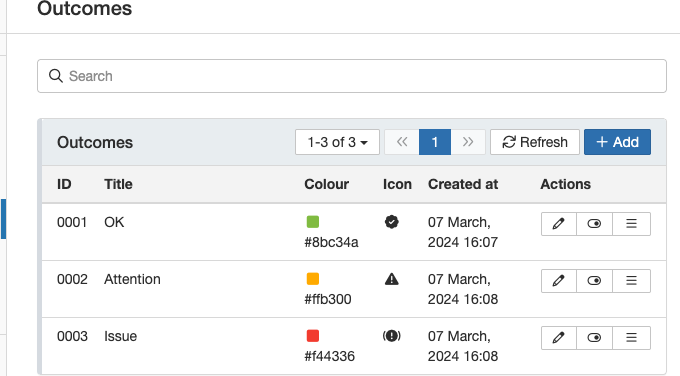
Defining outcome levels with colours and icons.
- Once outcomes have been created, they can be selected on the indicator thresholds. Each threshold can have an outcome assigned to it.
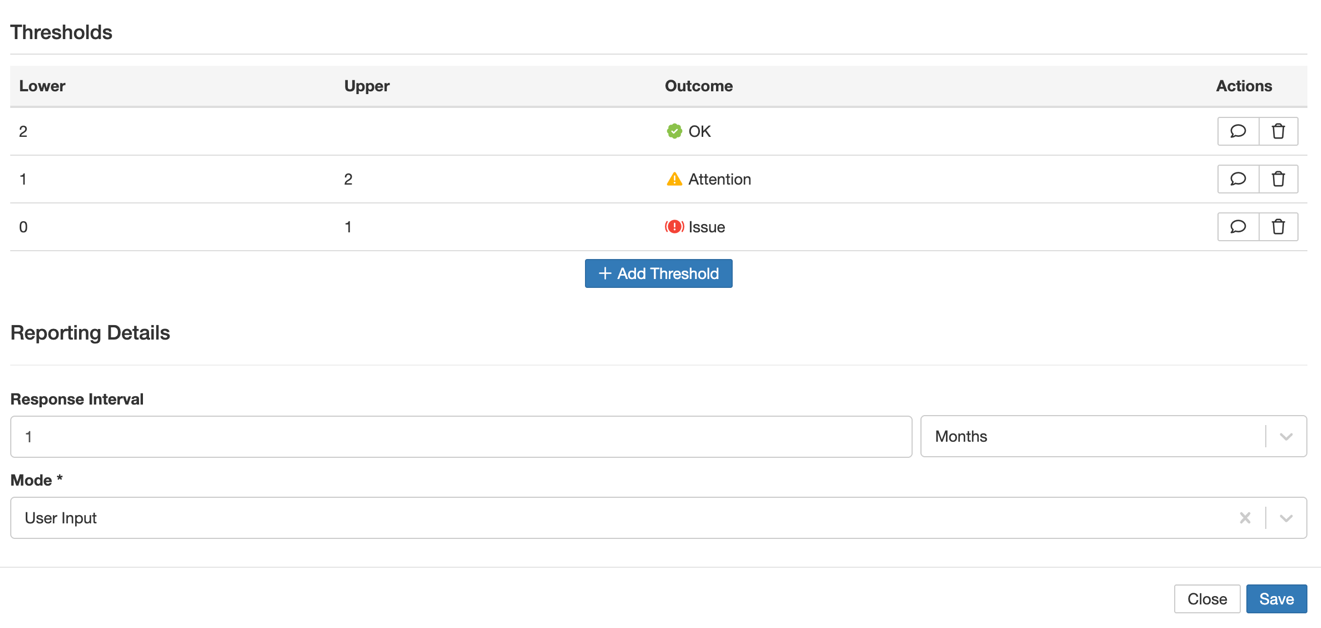
Assigning an outcome to an indicator threshold.
5. Common Issues & Troubleshooting
| Issue | Likely Cause | Solution |
| The Outcomes page is not available under Admin | The Indicators module is not enabled, or you do not have administrator access. | Confirm the Indicators module is enabled and that your account has administrator access. |
| An outcome does not appear when setting a threshold | The outcome has not been created yet, or was not saved. | Create and save the outcome under Admin then Outcomes before assigning it to a threshold. |
| The colour or icon is hard to distinguish | Similar colours or icons have been used across different outcomes. | Choose a distinct colour and icon for each outcome level so results are easy to tell apart. |
Best practices:
- Use a consistent set of outcome levels across your indicators so results are easy to interpret.
- Pick clear, distinct colours and icons, for example green for OK, amber for Attention, and red for Issue.
- Create all the outcomes you need before configuring thresholds, so each threshold can be assigned in one pass.
Click a title to preview it here. Use the Open full article button to read the full version in a new tab.
▾Relationships of Business Objectives Open full article »
Related article
How business objectives relate to one another and to other records, providing context for how indicators and their outcomes fit into your wider structure.
Was this article helpful?
That’s Great!
Thank you for your feedback
Sorry! We couldn't be helpful
Thank you for your feedback
Feedback sent
We appreciate your effort and will try to fix the article