TABLE OF CONTENTS
What is the difference between Library Control and Controls?
Library Control
The Library control is a centralised, reusable control that can be applied across different risks. This approach reduces duplication and aligns control implementation across your organisation. Updates to a library control can cascade (depending on configuration) to all control instances referencing it, ensuring organisation wide alignment.
Risk Control [or Control Context]
A Risk Control is a control that originates from a Library Control and is linked to a specific risk.
It acts like a local copy of the Library Control, some fields can be edited (if your configuration allows), while others remain locked to maintain consistency.
Each Risk Control remains directly connected to its original Library Control.
Control Creation
Creating a New Library Control (from a Risk)
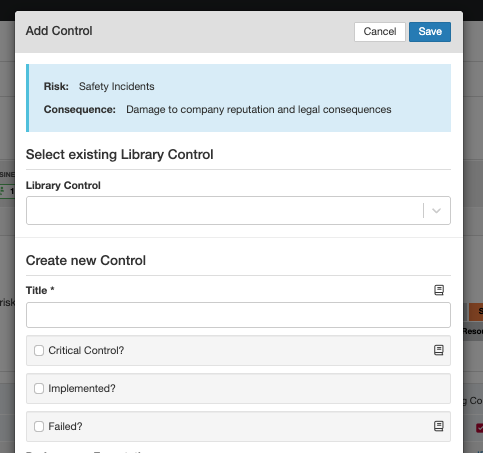
- When you click 'Add Control' on a Risk, you can either select an existing Library Control or create a new one.
- To create a new control, leave the Library Control dropdown empty and complete the Create new Control section.
- When saved, the system creates both a Library Control (with its own ID) and a linked Risk Control (with a separate ID). The Library Control is the central record that groups all related Risk Controls. Each Risk Control is automatically linked to the risk where it was created.
- The book icon fields are managed in the Library Control and shared across risks. Fields without the icon (in this example: Implemented) belong only to the Risk Control.
Creating a New Library Control (from within the Library Control)
- When you navigate to the Control Library and click 'Add', you are creating a new Library Control.
Each new Library Control is assigned its own unique Library Control ID. - When this Library Control is later referenced on a risk, a corresponding Risk Control is automatically created. The Risk Control inherits all shared fields from the Library Control, ensuring consistency across the system.
- If the Library Control is updated, those changes are reflected in all linked Risk Controls for the shared fields.
Fields that are not shared remain unique to each Risk Control.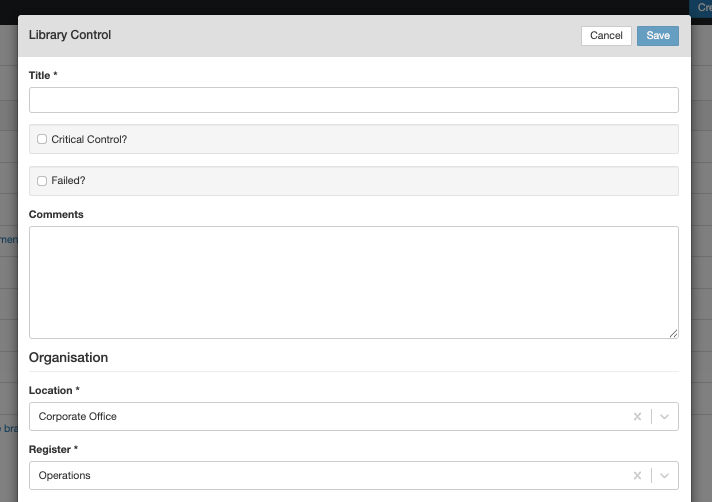
Example
This example shows a Risk Control with a shared field, Control Category, which is managed through the Library Control, and a non-shared field, Comments, which is unique to the Risk Control.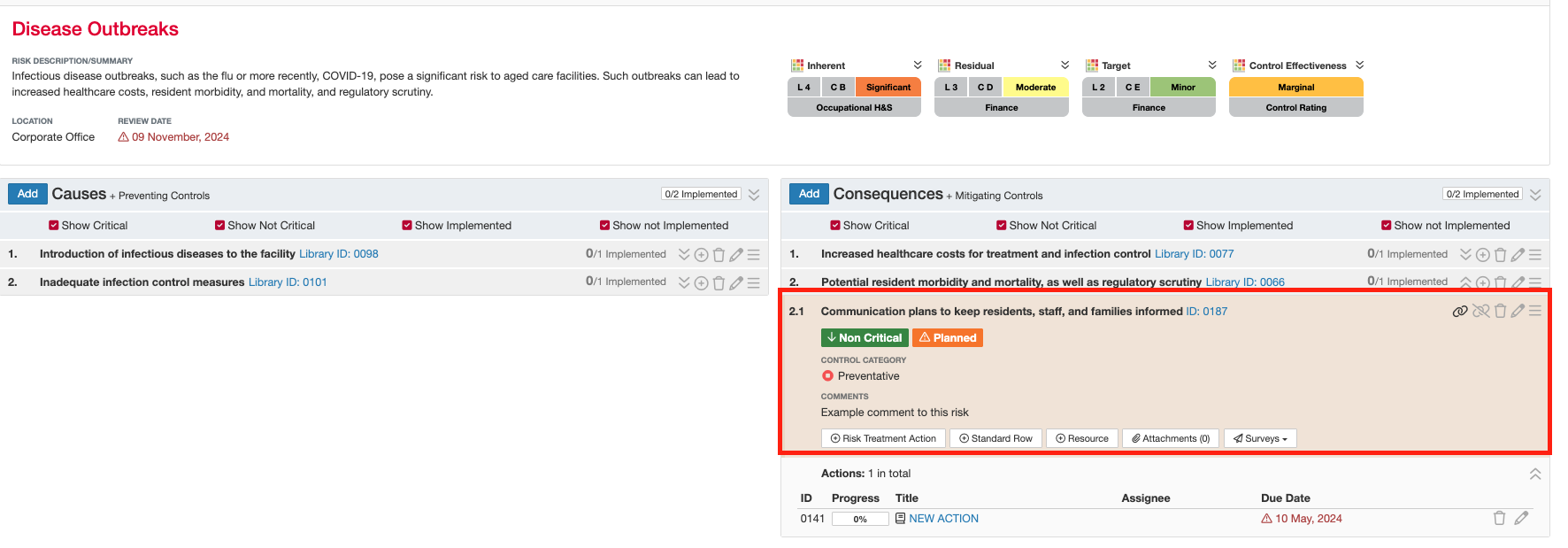
When you click the hyperlinked ID, you open the Risk Control detail view.
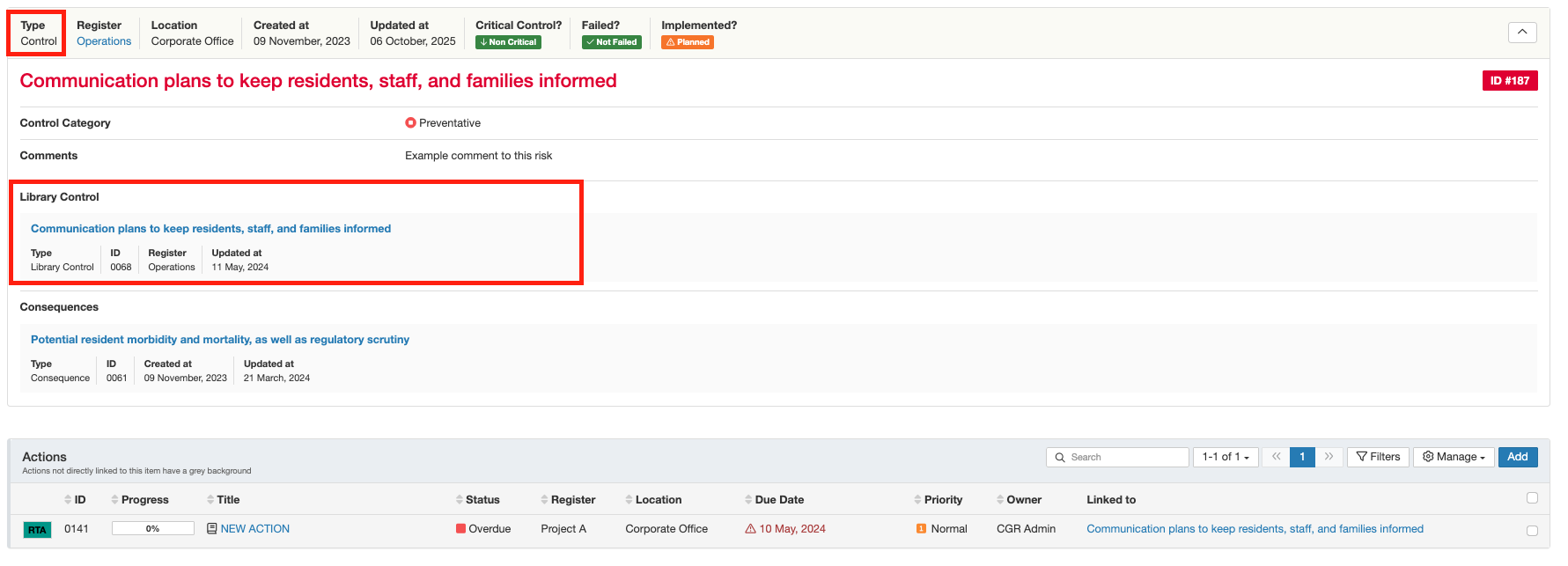
Here, you can see:
The originating Library Control it’s linked to.
The risk or item it’s associated with.
The label 'Control' in the top left confirms this is a Risk Control (not a Library Control). Below, you can view its key fields, the linked Library Control, and related sub-panels such as Actions and more.
Note: Causes and Consequences are only visible in Bowtie Mode, not in Simple Risk Mode.
When you click the Library Control hyperlink, you open the Library Control show view.
Here, you can see:
Where the Library Control has been used across different risks (listed under Risk Controls).
Values of fields that are managed at the Library Control level.
Other related sub-panels and information unique to each linked Risk Control.
The label 'Library Control' in the top left confirms you are viewing the central record that connects all associated Risk Controls.

Was this article helpful?
That’s Great!
Thank you for your feedback
Sorry! We couldn't be helpful
Thank you for your feedback
Feedback sent
We appreciate your effort and will try to fix the article