Custom Field Lookup Options: FAQ
Answers to the most common questions about adding, editing and disabling the options in a lookup field
Contents
- 1. What is a lookup field, and how is it different from an item lookup?
- 2. Who can add or update lookup options?
- 3. How do I add new options to a lookup field?
- 4. How do I edit an existing lookup option?
- 5. What happens to existing records when I rename an option?
- 6. How do I retire an option I no longer want people to use?
- 7. How do I create a completely new field?
- 8. Something is not working. What should I check?
- 9. Related Articles
1. What is a lookup field, and how is it different from an item lookup?
A lookup field is a dropdown on a record where you control the list of choices yourself. Lookup fields are sometimes called dropdowns, tags or categories, and they sit against a module such as risks, actions or incidents. As a system administrator you can add new options, edit existing ones and disable options you no longer want in use, without any help from Clew.
An item lookup is a different kind of field. It is a dropdown that pulls its values from a Clew Platform table, for example the list of users, so the choices are maintained by the platform rather than by you. You cannot add or edit options on an item lookup the way you can on a lookup.
A worked example. Your organisation reorganises and the business unit previously called "Operations" becomes "Operations and Logistics". Because the business unit field is a lookup, you can rename that one option in the admin area and every risk, action and incident already tagged with it will show the new name straight away. No record-by-record editing and no mass edit required.
2. Who can add or update lookup options?
You need to be a system administrator to follow any of the steps in this article. If you cannot see the admin area, or the custom fields list is not available to you, speak to a system administrator in your organisation rather than raising a support ticket.
- Access needed: system administrator permissions.
- Where you work: the admin area, under custom fields.
- What you need to know first: the name of the field you want to change, so you can find it in the search bar.
3. How do I add new options to a lookup field?
- Navigate to the admin area, then select custom fields.
- In the search bar, type the name of the field you are looking for.
- Click on the name of the field to open it.
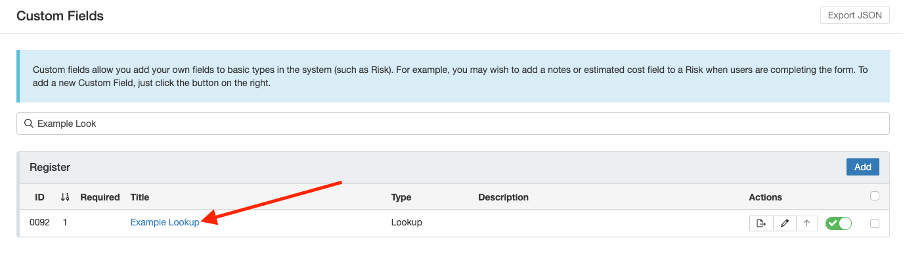
Search for the field in the admin area, then click its name to open it.
- Under lookup options, click add.
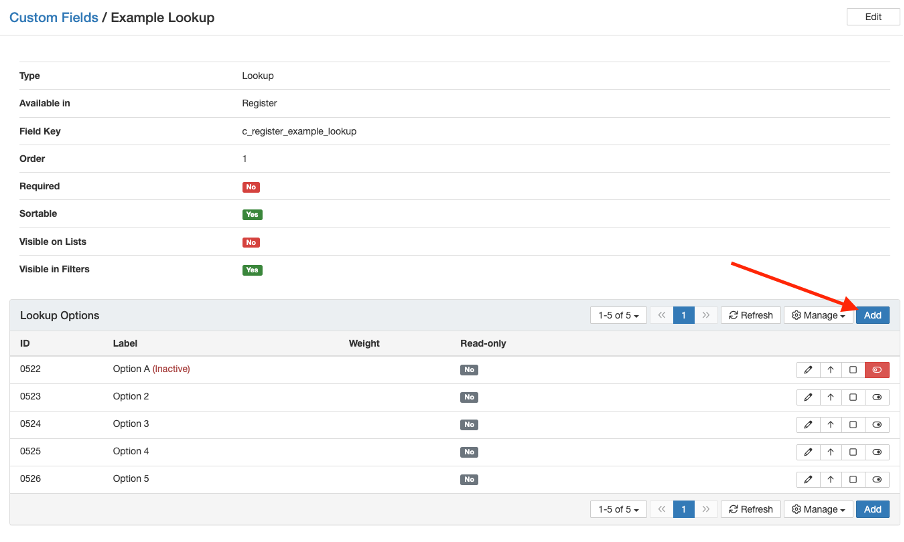
The add button under lookup options.
- Type the name of the option you want to add. You can add multiple options in the same sitting, so there is no need to save between each one.
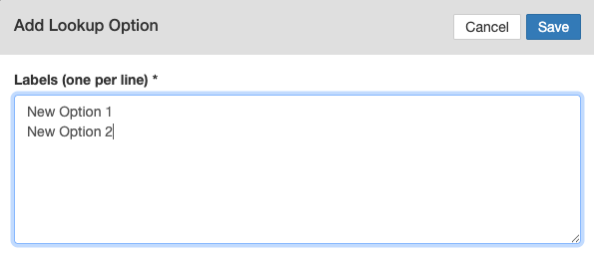
Type the option name. Several options can be added before you save.
- Once you have added everything you need, click save to apply your changes.
What you should see: the new options appear in the lookup options list, and they are immediately selectable in the dropdown on any record that uses the field.
4. How do I edit an existing lookup option?
- Open the field as described in question 3.
- Click the pencil icon next to the option you want to change. You can update the title, subtitle, colour, icon and more.
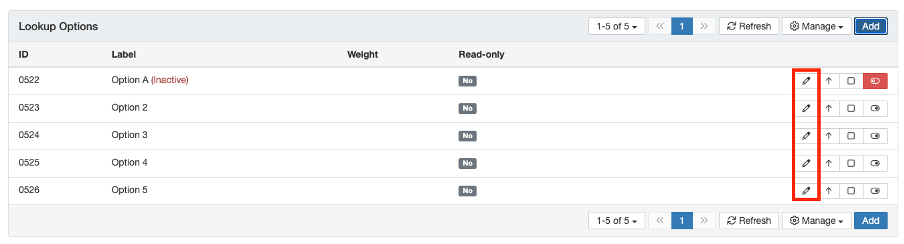
Use the pencil icon to edit an option.
- Make the necessary changes to the information, then click save.
5. What happens to existing records when I rename an option?
Every record that already uses the option will display the updated title. This is usually what you want, because it lets you make a change across the board without mass editing individual records.
6. How do I retire an option I no longer want people to use?
Use the toggle next to the option to disable it. A disabled option is no longer offered in the dropdown, and records that already carry it keep it exactly as it was.
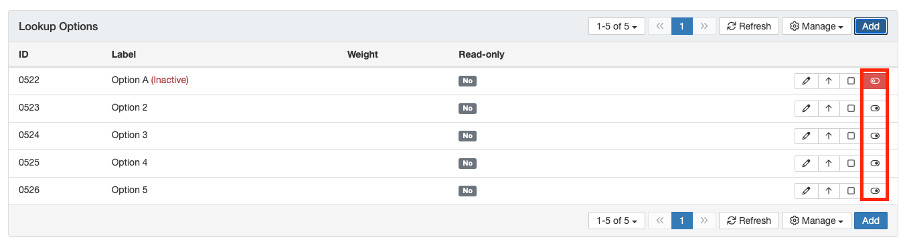
Use the toggle to disable an option.
If you are replacing one option with another and you want historical records to keep the old wording, the best approach is to disable the option being replaced and then create a new one. Renaming would rewrite the history, whereas disabling and adding preserves it.
7. How do I create a completely new field?
This article covers the options inside a field that already exists. If the field itself does not exist yet, follow the Custom Fields article, then come back here to populate its lookup options.
8. Something is not working. What should I check?
| Issue | Likely Cause | Solution |
| There is no lookup options area on the field | The field is an item lookup, which draws its values from a Clew Platform table rather than from a list you control | Confirm the field type. Item lookup values cannot be edited here. Change the underlying data, for example the user list, instead |
| The new option does not appear on records | The change was typed in but not saved | Reopen the field, check the option is listed under lookup options, and click save. Refresh the record and check again |
| Old records now show the new wording and you did not want that | The option was renamed, which applies to every record using it | Rename the option back to its original title, then disable it and create a new option with the new wording |
| You cannot find the field in the search bar | The search uses the field name as configured, which may differ from the label your team uses day to day | Search on a partial word, or open the record and check the exact field name before searching again |
| The admin area or custom fields list is not visible | Your account does not hold system administrator permissions | Ask a system administrator in your organisation to make the change or to review your permissions |
Best practices:
- Decide before you start whether historical records should show the old wording or the new wording. That single decision tells you whether to rename or to disable and replace.
- Keep option lists short and meaningful. Long dropdowns slow users down and encourage inconsistent tagging.
- Disable rather than delete when an option falls out of use, so your reporting history stays intact.
- Add related options in one sitting and save once, rather than saving after each one.
- Tell the people who use the module when you change an option, especially if they report on it.
Click a title to preview it here. Use the Open full article button to read the full version in a new tab.
▾Custom Fields Open full article »
Related article
How to create a new custom field against a module, choose its field type and make it available on records. Start here if the field you need does not exist yet.
Was this article helpful?
That’s Great!
Thank you for your feedback
Sorry! We couldn't be helpful
Thank you for your feedback
Feedback sent
We appreciate your effort and will try to fix the article