Why can't I see the LTI Frequency Rates?
What a missing LTI Frequency Rates button means, and how to request access
If you do not see the LTI Frequency Rates button under your name in the top-right corner, it means you do not have the access needed to add or manage LTI Frequency.
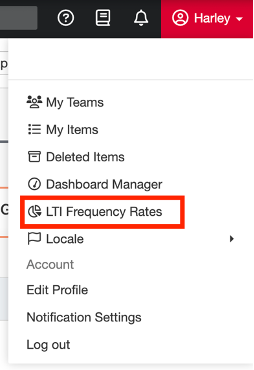
The LTI Frequency Rates option appears under your name when you have access.
How to get access
Access can currently only be granted by Clew. Contact your system administrator, who can initiate the access request with Clew by reaching out to support@clew.io.
Click a title to preview it here. Use the Open full article button to read the full version in a new tab.
▾Lost Time Injury Frequency Rate - LTIFR Open full article »
Related article
What the Lost Time Injury Frequency Rate is and how it is calculated.
Was this article helpful?
That’s Great!
Thank you for your feedback
Sorry! We couldn't be helpful
Thank you for your feedback
Feedback sent
We appreciate your effort and will try to fix the article