TABLE OF CONTENTS
Context
The search bar helps you quickly find items in the system by typing an ID, title, or keyword. It searches across records and shows the most relevant results.
The search bar does not return users or roles, and it won’t list all records assigned to them.

How it works
The system searches for your keyword in the record title or description field (the field name may vary by configuration).
It also finds related words, for example, searching for manage may return management or managing.
The search includes:
• ID, e.g. a risk or action ID number
• Title, the name of the record
• Description, any text or keywords within the item
Search results
• Single match: If only one record matches your search, it opens automatically.
• Multiple matches: If several items match, a list of results appears so you can choose the correct one.
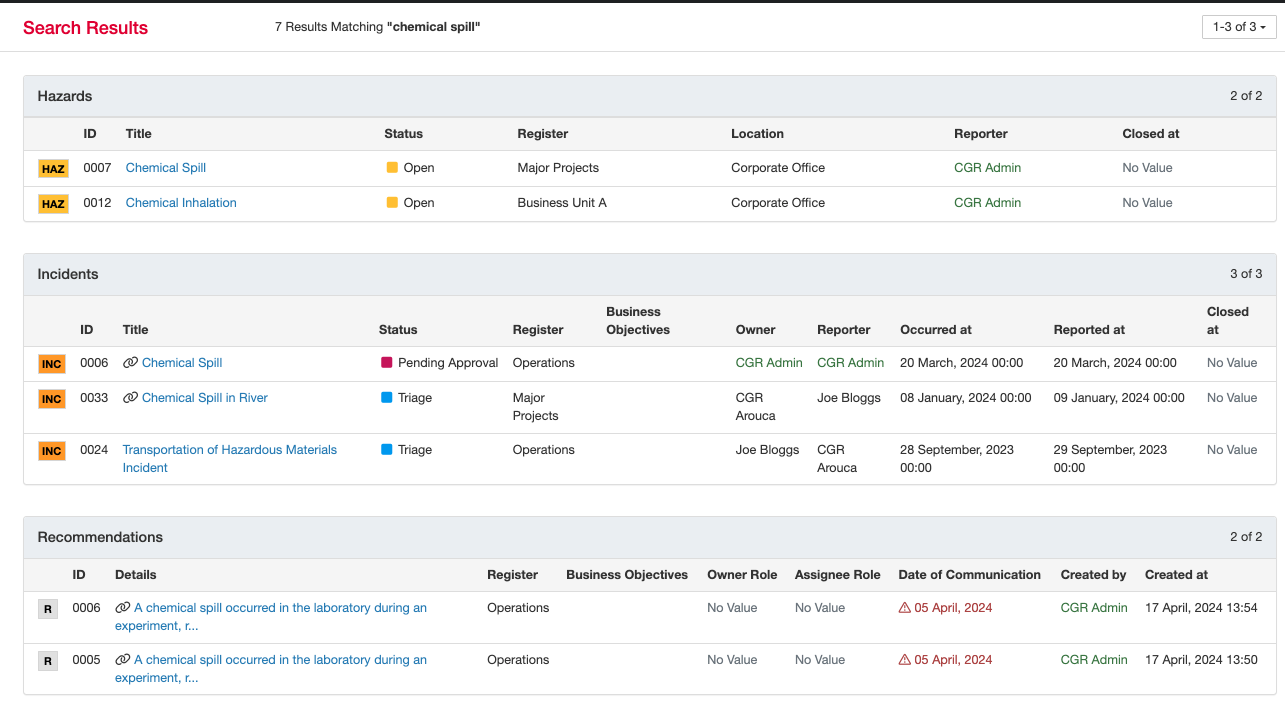
Tips for better results
• Use specific keywords or part of the ID.
• Check for typos or extra spaces.
Was this article helpful?
That’s Great!
Thank you for your feedback
Sorry! We couldn't be helpful
Thank you for your feedback
Feedback sent
We appreciate your effort and will try to fix the article