TABLE OF CONTENTS
Context
Custom Types allows you to have more than one type of any record (e.g. Risks and Opportunities). However, if required, you can hide the custom type from the Add button and Project view.
Please Note: System Admin access is required to access the custom types.
How do I hide custom type from the Add button
- Navigate to Admin > Custom types.
- Use the search panel to locate the custom type.
- Click on custom type and select the “Edit” option from the top-right corner

4. Scroll to the “Item Settings”. Where you will see below two options to hide the custom type:
- Hide from Add Button When this option is selected, the custom type will be hidden from the Add button across the entire application. The main purpose of this option is to restrict record creation to a specific team. When enabled, users will not be able to create records of this custom type from the Add button. Instead, you can make this custom type available under the Create menu and scope it to a particular team.
- Hide from Add button on List View and Project Page: When this option is selected, the custom type will be hidden from the Add button on the Register page and List View only.
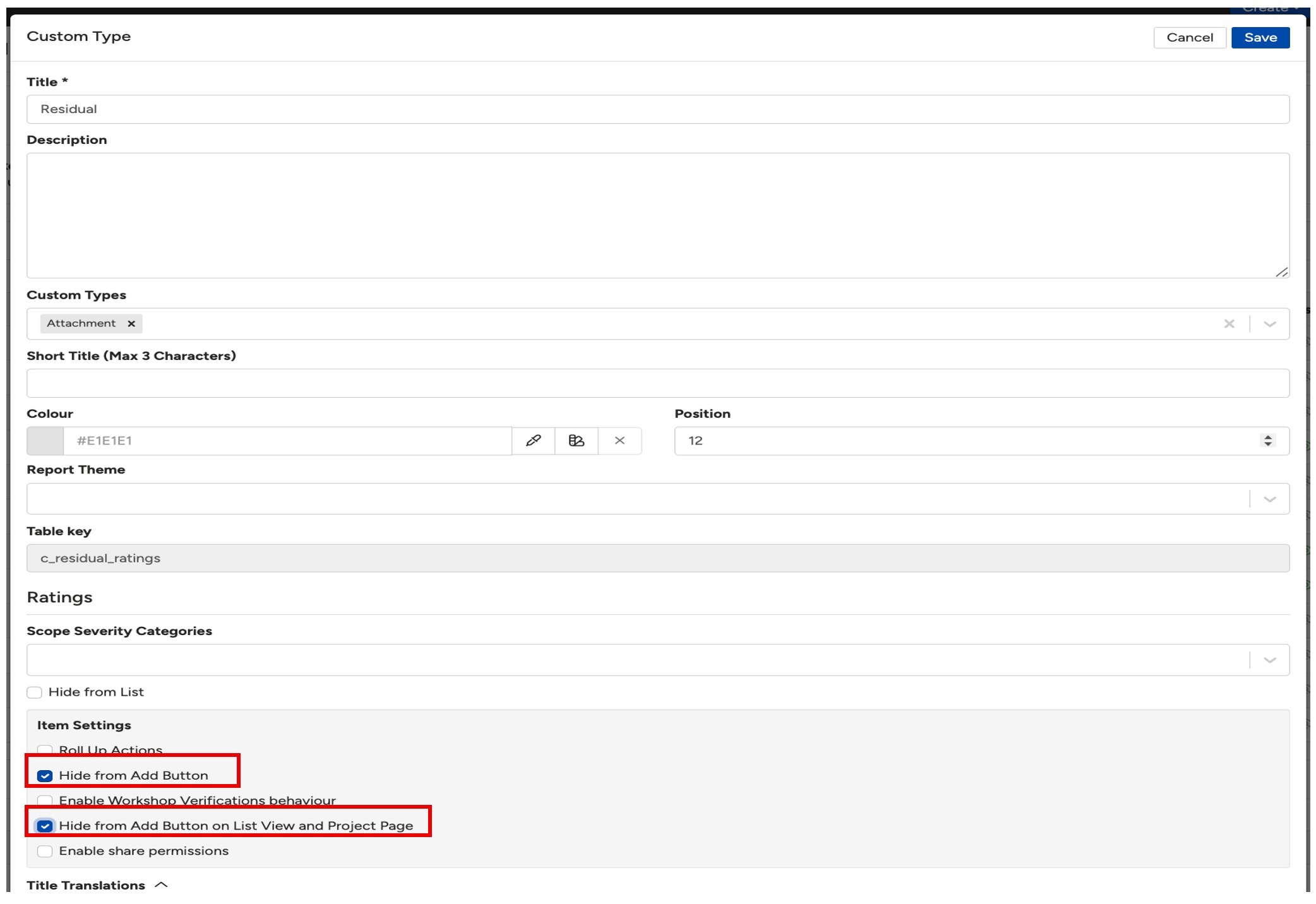
5. Once you selected the above options, click the Save button to apply the changes.
Was this article helpful?
That’s Great!
Thank you for your feedback
Sorry! We couldn't be helpful
Thank you for your feedback
Feedback sent
We appreciate your effort and will try to fix the article