How do I get or grant System Administrator access?
Who can assign System Administrator access, what it covers, and how to grant it
Only existing System Administrators can assign users this level of access. If you need it, contact your System Administrator or IT to be added.
How to grant System Administrator access
If you are already a System Administrator and want to assign another user this access:
- Navigate to the user's edit form within Admin.
- Select the System Administrator checkbox.
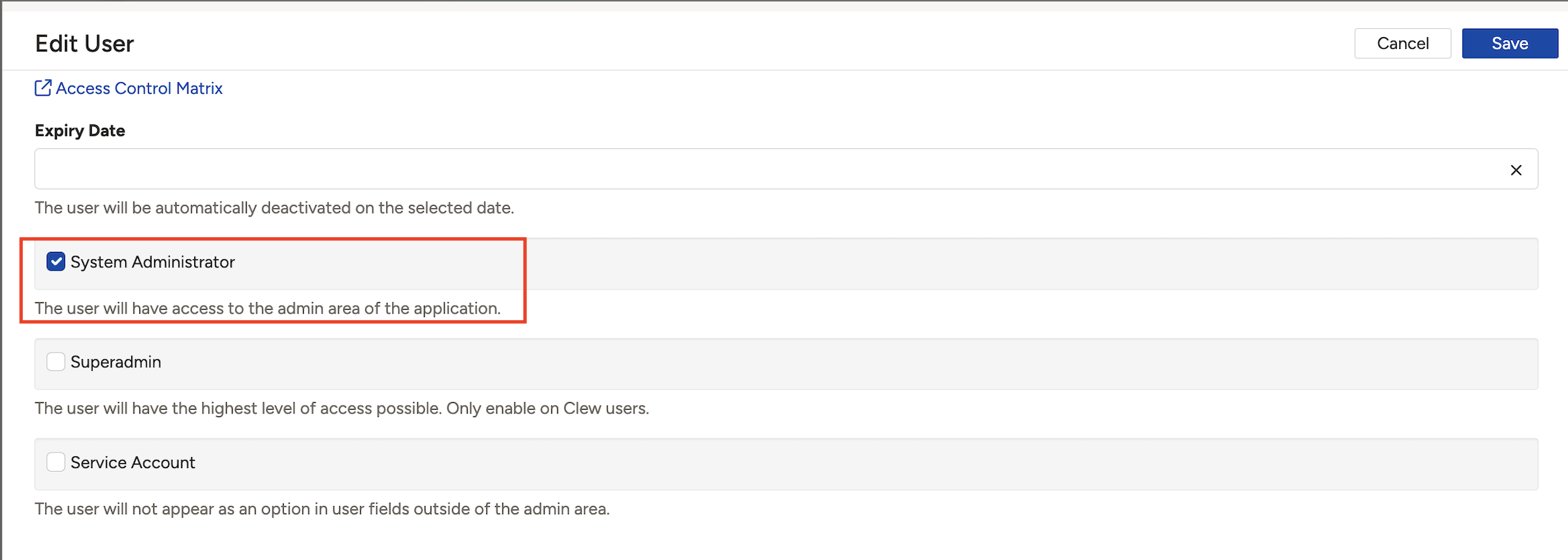
The System Administrator setting on a user's profile.
Click a title to preview it here. Use the Open full article button to read the full version in a new tab.
▾Adding New Users Open full article »
Related article
How to add a user and set their access, including the System Administrator option.
▾What permissions does a security group provide? Open full article »
Related article
How access to items and modules is granted, which is separate from System Administrator.
Was this article helpful?
That’s Great!
Thank you for your feedback
Sorry! We couldn't be helpful
Thank you for your feedback
Feedback sent
We appreciate your effort and will try to fix the article