How to view the Security Groups that apply to a register?
How to see which security groups are assigned to a register and open each one to review its access.
Contents
- 1. Introduction & Context
- 2. Key Features & Functions
- 3. Requirements
- 4. Step-by-Step Guide
- 5. Common Issues & Troubleshooting
- 6. Related Articles
1. Introduction & Context
The Registers list shows which security groups control access to each register, so you can quickly see who can reach a register and open any group to review its permissions and members. This is how you check the access levels that apply to a register without changing anything.
Who is it for? System administrators. To review the security groups assigned to a register you must be a system administrator. If you are not, contact your system administrator for help.
What does it impact? Nothing. This is read-only viewing. You are checking which security groups apply to a register, not adding, removing, or changing access.
2. Key Features & Functions
- Lock icon count: each register shows a lock icon with the number of security groups assigned to it, so you can see at a glance how many groups control its access.
- Detailed View: switch to Detailed View to see the names of the assigned security groups, each linked to its own security group page.
- Drill into a group: open any security group to view its access permissions and the users who belong to it.
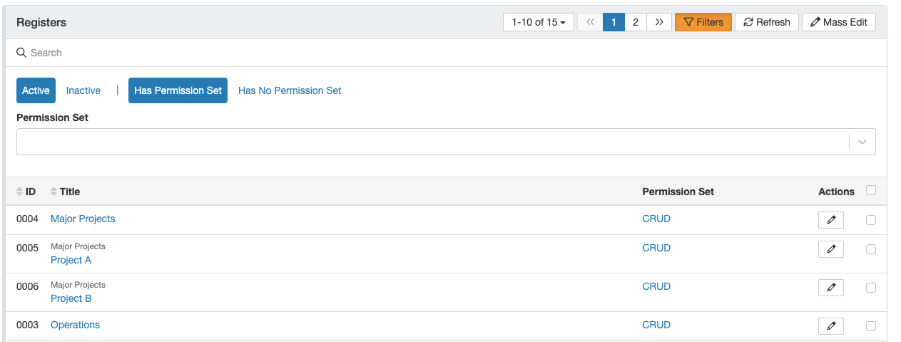
- Filter by permission set: when you have many registers, filter to show only those with an assigned permission set.
3. Requirements
- System administrator access. You must be a system administrator to view the security groups assigned to a register. If you are not, contact your system administrator.
- At least one security group must be assigned to the register for anything to appear against it.
4. Step-by-Step Guide
Viewing the security groups on a register
- Navigate to Registers to view all registers in the system.
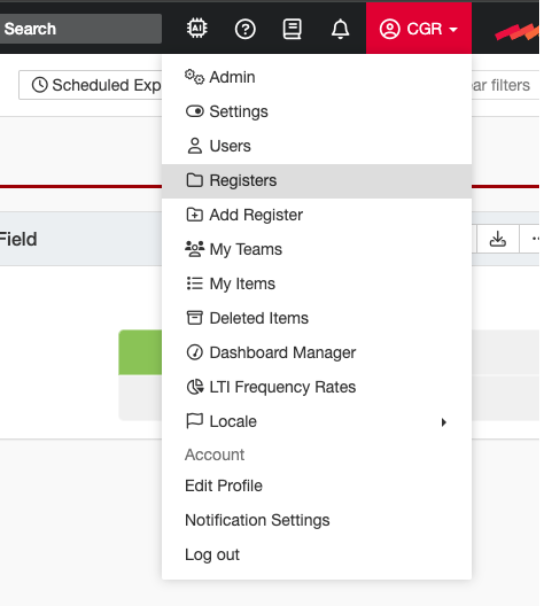
The Registers page, showing all registers in the system.
- Look at the lock icon against a register. It shows the number of security groups assigned to that register.

The lock icon shows the number of security groups assigned to a register.
- Switch to Detailed View to see the names of the assigned security groups. Each name links to its corresponding security group page.
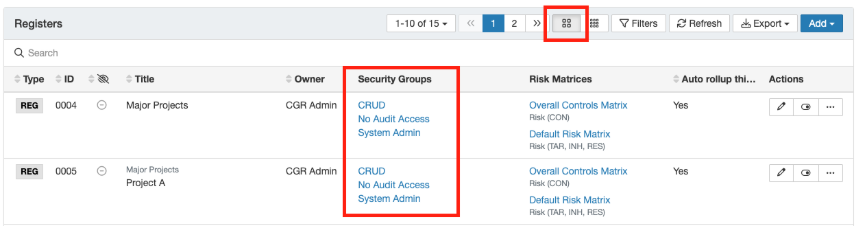
Detailed View lists the names of the assigned security groups, each linked to its group page.
- Click the hyperlink for a security group to view its access permissions and see which users belong to it.
Opening a security group shows its access permissions and the users who belong to it.
5. Common Issues & Troubleshooting
| Issue | Likely Cause | Solution |
| I cannot see the Registers page or the security group details. | You are not a system administrator. | Only system administrators can review the security groups assigned to a register. Contact your system administrator for help. |
| A register shows no lock icon or a count of zero. | No security groups are assigned to that register yet. | Assign a security group to the register if access should be controlled. See the Security Groups article in the Related Articles section. |
| I can see the count but not the group names. | You are in the standard list view rather than Detailed View. | Switch to Detailed View to see the names of the assigned security groups, each linked to its page. |
| There are too many registers to scan through. | The list is not filtered. | Use the filter to show only registers with an assigned permission set. |
Best practices:
- Use Detailed View when you need the group names, and the lock icon count when you only need a quick sense of how locked down a register is.
- Open a security group to confirm both its permissions and its members before assuming who has access.
- Review register access periodically, so security groups still match who should be able to reach each register.
Click a title to preview it here. Use the Open full article button to read the full version in a new tab.
▾Security Groups Open full article »
Related article
What security groups are, how they define access, and how they are created and assigned to users and registers.
▾Permission Sets Open full article »
Related article
What a permission set is and how it is used, including filtering registers by their assigned permission set.
Was this article helpful?
That’s Great!
Thank you for your feedback
Sorry! We couldn't be helpful
Thank you for your feedback
Feedback sent
We appreciate your effort and will try to fix the article