How did my new register have security groups assigned by default?
Why a new register inherits security groups, and how to view the ones applied
When creating a new register, if the Cascade policies option (copy permissions from the parent register to this register) is selected, the system automatically copies all Security Groups from the parent register to the new child register.
How to view the security groups applied to a register
As a system administrator, you can view the different security groups applied to a register:
- Navigate to Admin > Registers.
- Click the Detailed View icon to view the Security Groups applied to each register.
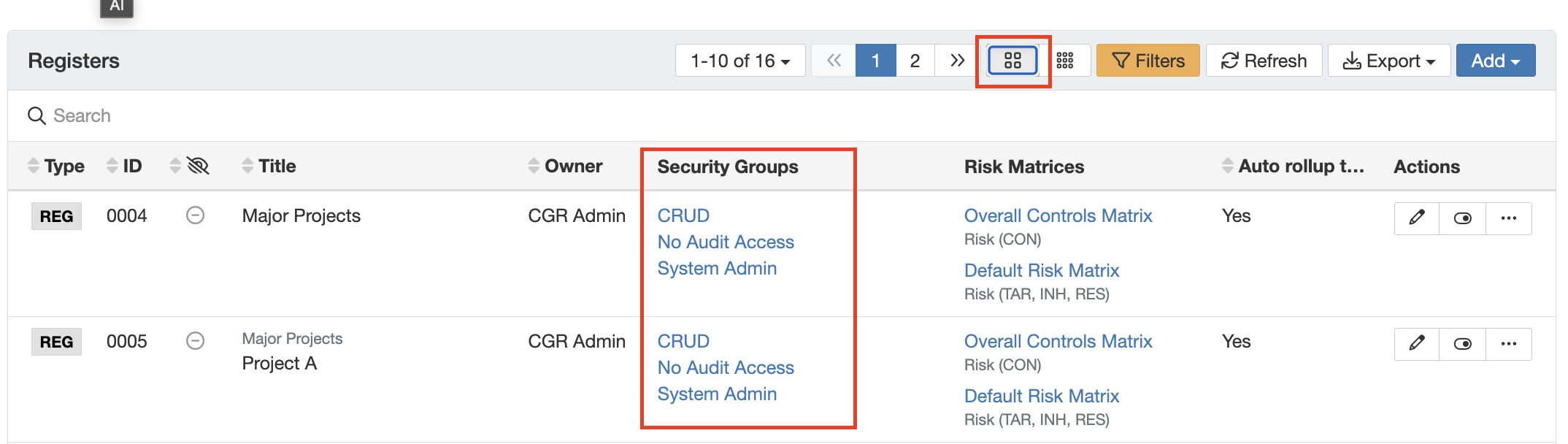
The Detailed View of registers, showing the Security Groups applied to each.
Click a title to preview it here. Use the Open full article button to read the full version in a new tab.
▾Security Groups Open full article »
Related article
How security groups control access to registers and their data.
▾Registers Open full article »
Related article
How registers are set up, including parent and child registers.
Was this article helpful?
That’s Great!
Thank you for your feedback
Sorry! We couldn't be helpful
Thank you for your feedback
Feedback sent
We appreciate your effort and will try to fix the article