Defining Pass or Fail in a Survey
How a survey decides pass or fail, including fail choices and the rule that sets an outcome.
Contents
- 1. Introduction & Context
- 2. Key Features & Functions
- 3. Requirements
- 4. Step-by-Step Guide
- 5. Common Issues & Troubleshooting
- 6. Related Articles
1. Introduction & Context
When a survey is scored, each response is recorded as Pass, Fail, or No Outcome. Pass means the passing criteria were met, Fail means they were not, and No Outcome means none were set or they could not be evaluated. A survey with scoring switched off has no outcome and is purely informational.
Who is it for? Administrators who set a survey's passing criteria, and anyone reviewing responses. What does it impact? The criteria you set decide every response's outcome, and editing a response recalculates it.
2. Key Features & Functions
- Pass score: the response's total score is compared to a pass score. At or above it passes, below it fails.
- Fail choice: a multiple choice answer marked as Fail fails that question when selected.
- Fail if any of the children fail: when set to Yes, one failed question fails the whole survey, whatever the score.
- Rule that sets an outcome: a rule links a condition, such as a chosen answer, to a specific outcome.
- Results per item: a section or question can show its own pass or fail, separate from the overall survey.
3. Requirements
- Scoring enabled on the survey, otherwise responses show No Outcome.
- A pass score and scores on the answer choices, for score-based pass or fail.
- Administrator access to edit the build and set the passing criteria.
4. Step-by-Step Guide
Set a pass score
Score-based pass or fail compares the response's total score, built from the scores on the answer choices, against a pass score you set on the survey. At or above the pass score is a Pass, below it is a Fail, and if the score or pass score is missing the result is No Outcome.
Fail on a specific answer
Use this when one answer should fail the survey on its own, for example "No, we don't have fire extinguishers".
- In the build, open the choice on a multiple choice question (the Edit Choice dialog) and tick Fail. Selecting it now fails that question and its section.
- To fail the whole survey on it, set Fail if any of the children fail to Yes. The outcome is then Fail whatever the score.
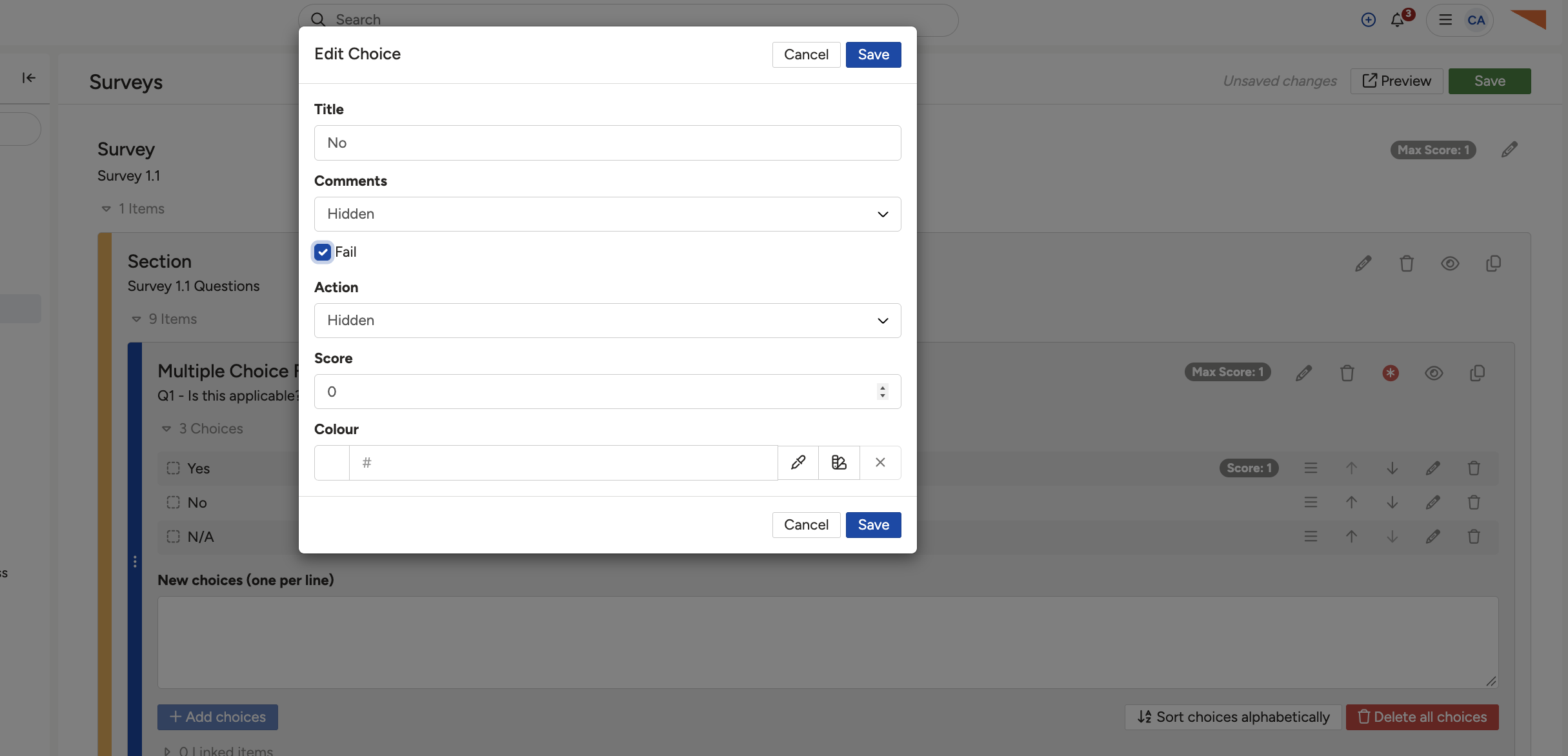
The Edit Choice dialog, where a choice can be given a score and marked as a Fail choice.
The rule that sets an outcome
A rule links a condition, such as choosing a certain answer, to a specific outcome, so the system records that outcome in place of a plain pass or fail. Create any custom outcome you need first (in Admin), then:
- Open the Survey Build, scroll to the bottom, and expand the Rules section.
- Select Add Rule, name it, and set the conditions that should trigger an outcome.
- Expand Results, choose Add Result, and select the matching outcome.
If one rule applies, its outcome becomes the survey's. If several apply with different outcomes, the survey shows no single outcome and each result keeps its own.
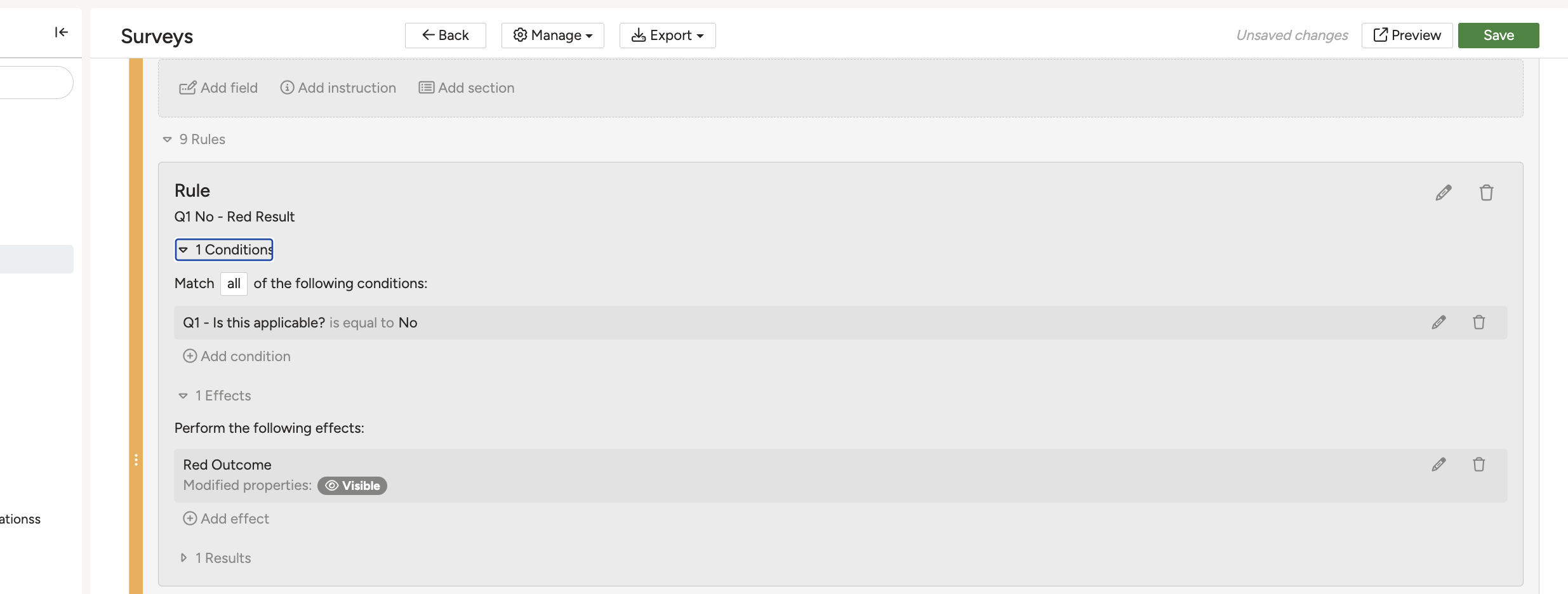
The Rules and Results sections of a Survey Build, where a condition is linked to an outcome.
5. Common Issues & Troubleshooting
| Symptom | Cause and what to do |
| A Fail choice was selected but the survey still passed. | Fail if any of the children fail is not set to Yes. Set it to Yes so a single failed question fails the response. |
| The response shows No Outcome. | Scoring is off, no pass score is set, or the scoring data is incomplete. Enable scoring, set a pass score, and give the answer choices scores. |
| A rule is satisfied but no outcome appears. | More than one rule produced a different outcome, so there is no single one. This is expected. Design the rules so only one applies to a given response. |
▾What Determines the Outcome of a Survey? Open full article »
Related article
The full set of outcome types, including custom outcomes, and what the green, red and grey labels mean on a response.
▾How to build a survey? Open full article »
Related article
Building the survey itself, including the questions and answer choices that the scoring described here is applied to.
▾Responding to a Survey Open full article »
Related article
Completing and submitting a survey, which is the point at which the outcome described here is calculated.
Was this article helpful?
That’s Great!
Thank you for your feedback
Sorry! We couldn't be helpful
Thank you for your feedback
Feedback sent
We appreciate your effort and will try to fix the article