How can I link a sub-panel to a show view?
Enabling a sub-panel so it appears on a record's show view
System administrators can make sub-panels available on the show views by following these steps:
- Navigate to Admin > Custom Type.
- Select the Custom Type you want the sub-panel to appear on.
- Scroll down to Settings and search for the name of the sub-panel you want to enable.
- Switch the Enabled toggle on, so it appears in green. The sub-panel is now enabled for the show view.
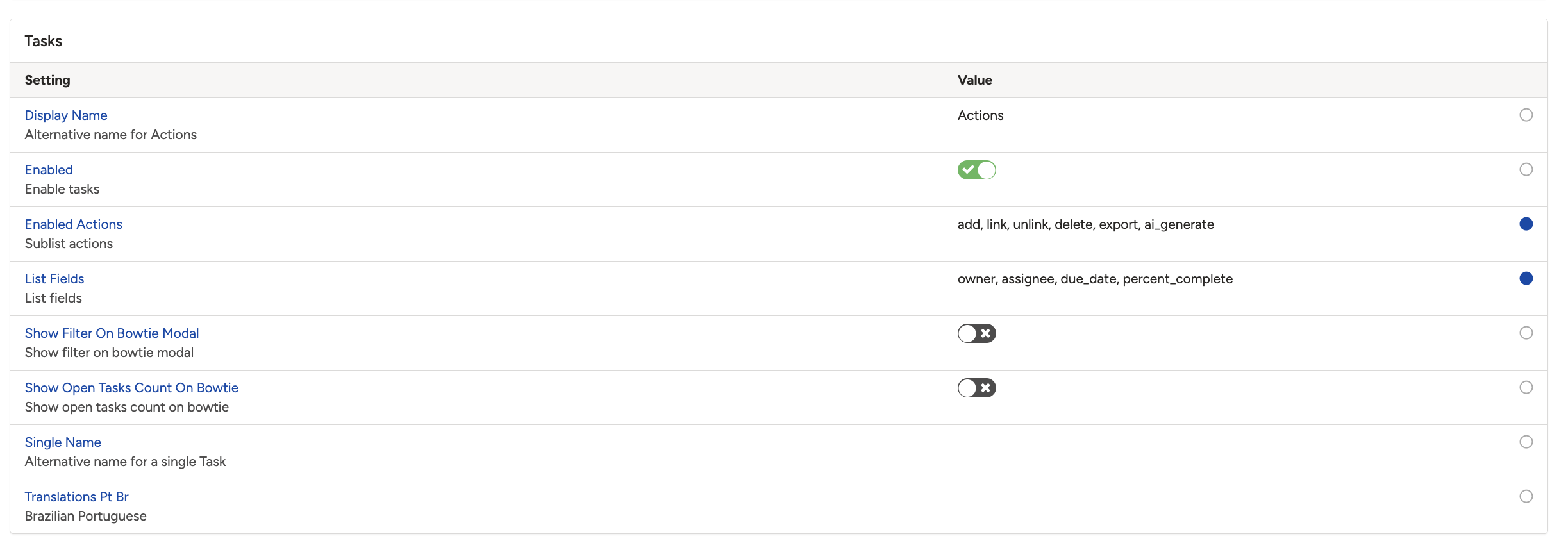
The Enabled toggle switched on (green) for the sub-panel in Settings.
Note: Sub-panels can be found under either the module name or the display name, for example module name Task, display name Actions.
Important: Not all modules can be linked or enabled as sub-panels.
▾Custom Types Open full article »
Related article
How to create, configure and manage custom types and their sub-panels.
Was this article helpful?
That’s Great!
Thank you for your feedback
Sorry! We couldn't be helpful
Thank you for your feedback
Feedback sent
We appreciate your effort and will try to fix the article