Why is there an extra System-generated row on an indicator?
The extra System-generated row is the reading Clew takes for you each period, not an error.
This is expected, not a fault. An automatic indicator takes its own reading on a set schedule. Each time it does, Clew adds a response row for that period and marks it System-generated, so that row is the automatic reading rather than a duplicate or something you need to fill in by hand.
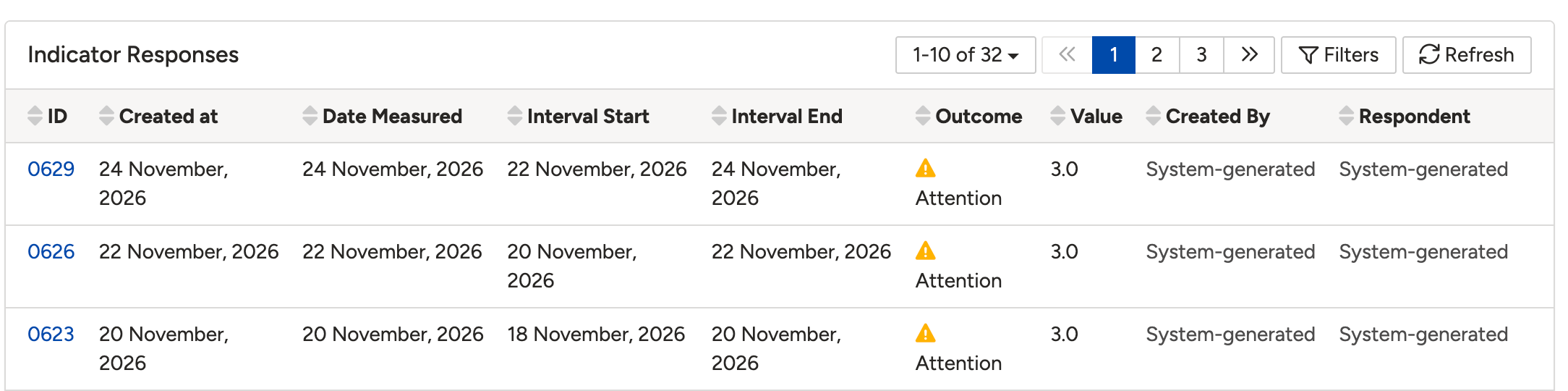
The Indicator Responses panel, with each period's reading added automatically and marked System-generated.
Every reading is rated against your thresholds, so each System-generated row carries an outcome such as OK, Attention or Issue. You will find them all in the Indicator Responses panel on the indicator record.
Good to know
If a System-generated row appears but its value is blank, no metric has been set yet, so there is nothing for Clew to measure. Open the indicator and set its metric so Clew has a value to read each period.
Click a title to preview it here. Use the Open full article button to read the full version in a new tab.
▾Automatic Indicators Open full article »
Related article
How an automatic indicator measures itself on a schedule, where to set its metric and interval, and how to read its results.
▾Manual Indicators Open full article »
Related article
The alternative to an automatic indicator, where a person enters each reading by hand instead of Clew recording it on a schedule.
Was this article helpful?
That’s Great!
Thank you for your feedback
Sorry! We couldn't be helpful
Thank you for your feedback
Feedback sent
We appreciate your effort and will try to fix the article