How to view the teams another user is a member of?
You must be a system administrator to see which teams another user is part of.
Please follow the below steps:
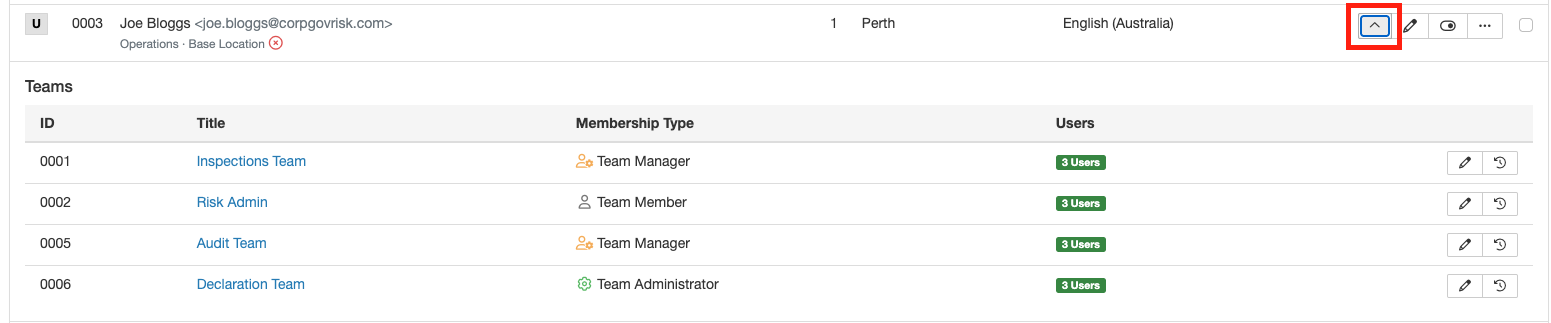
- Go to Admin > Users.
- In the user list view, select the down arrow next to the user you need to see the teams for.
You can find more information about Team Management in this article.
How to view the teams you are a member of?
Any user can see which groups they are a member of.
Please follow the below steps:
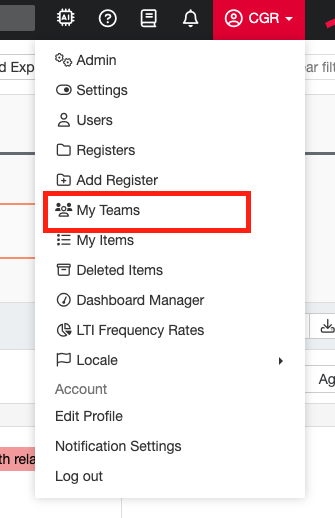
- Click on your name in the top right-hand corner.
Was this article helpful?
That’s Great!
Thank you for your feedback
Sorry! We couldn't be helpful
Thank you for your feedback
Feedback sent
We appreciate your effort and will try to fix the article