Understanding The Risk & Opportunity Module
What the module is for, how risks and opportunities are structured, and what you can do with them
Contents
- 1. Introduction & Context
- 2. Key Features & Functions
- 3. Requirements
- 4. Step-by-Step Guide
- 5. Common Issues & Troubleshooting
- 6. Related Articles
1. Introduction & Context
The Risk & Opportunity module is where you log, assess, and manage the risks and opportunities across your organisation, so your team has a single, up-to-date view of them. Clew manages both risks and opportunities in the same module, and both hold the same core information: their causes, their consequences, and the controls in place to manage them.
Records are grouped into registers. What you can see and do in the module depends on your access to the records, so some actions described here may not appear for every user.
2. Key Features & Functions
Causes, consequences, and controls
Each record captures what could cause the risk or opportunity, what its consequences would be, and the controls that manage it. Controls are the enduring measures that keep a risk in check. Actions are the one-off pieces of work that start and close, for example procuring more training or switching a provider. Keeping that distinction clean is the difference between a register that records risk and one that manages it.
Two ways to structure a risk: simple and bow tie
Clew supports two approaches, which hold the same core information. The single difference is where your controls sit:
- Simple risk: all controls sit in one table, so you can see at a glance which are marked not effective.
- Bow tie risk: controls attach to specific causes and consequences, with a visual view that makes it obvious where protection is thin.
Simple suits most enterprise and operational risks and keeps control data consistent through the control library. Bow tie suits technical safety risks and top risks that justify deeper analysis. A practical route is to start a risk type on simple, then move your top risks to bow tie once the control data is trustworthy. For the full detail, including how to add causes, consequences, and controls under each approach, see Simple & Bowtie Risks in Related Articles.
3. Requirements
What you can do with records depends on your access level to the items: Create, Read, Update, Delete, Mass, and Share. Whether a risk type uses the simple or bow tie approach is set at system level: simple throughout, bow tie throughout, or a mix where one risk type defaults to simple and another to bow tie.
4. Step-by-Step Guide
Opening the module
- Open Risks from the Modules menu.
- Select the register from the register filters at the top. Your records display as a list.
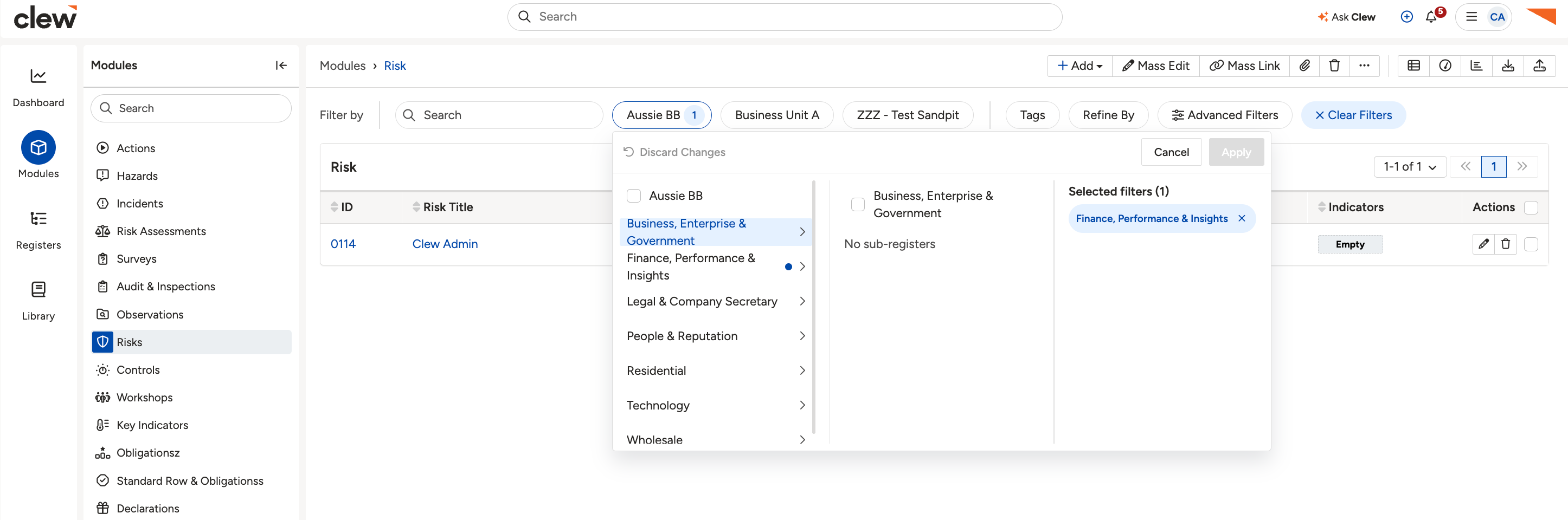 The Risk & Opportunity module open at a register
Adding a risk or opportunity
- Click the Add button.
- Complete the record's fields, then save.
- Add the record's causes, consequences, and controls. The exact steps depend on whether the risk is simple or bow tie, which is covered in Simple & Bowtie Risks.
5. Common Issues & Troubleshooting
| Issue | Likely cause | Solution |
| You cannot switch a risk between simple and bow tie. | The approach is controlled by a system setting, not per record. | Ask your system administrator. The setting can be simple throughout, bow tie throughout, or mixed by risk type. |
| A register's records are not showing. | A register filter or saved filter is applied, or you do not have access. | Clear the filter, or check your access with your system administrator. |
Click a title to preview it here. Use the Open full article button to read the full version in a new tab.
▾Simple & Bowtie Risks Open full article »
Related article
The two ways to manage a risk in Clew, and how to add causes, consequences, and controls under each.
▾List View & Datagrid Open full article »
Related article
How to view and work with your records in List View and the Data Grid.
▾Risk Matrices Open full article »
Related article
How risk matrices and ratings score your risks and opportunities.
Was this article helpful?
That’s Great!
Thank you for your feedback
Sorry! We couldn't be helpful
Thank you for your feedback
Feedback sent
We appreciate your effort and will try to fix the article