Can I mass link controls to causes?
How to link controls to causes in bulk using a CSV import
The short answer
Yes. You can mass link controls to causes using the Import option on the risk module view. By following the import format, you can link causes and controls together in bulk rather than one at a time.
How to mass link controls to causes
- In the risk module view, click the Import button in the top-right corner to open the Import CSV window.
- Prepare a CSV file that matches the expected structure (shown below). The columns are Title, Cause Title, and Preventing Control Title.
| Title | Cause Title | Preventing Control Title |
| Risk 1 | Cause 1 | Control 1.1 |
| Control 1.2 | ||
| Risk 2 | Cause 2 | Control 2.1 |
To get a correctly formatted file, use Download Template in the Import CSV window, or export a CSV (Bowtie) from a list or show view for a directly importable example.
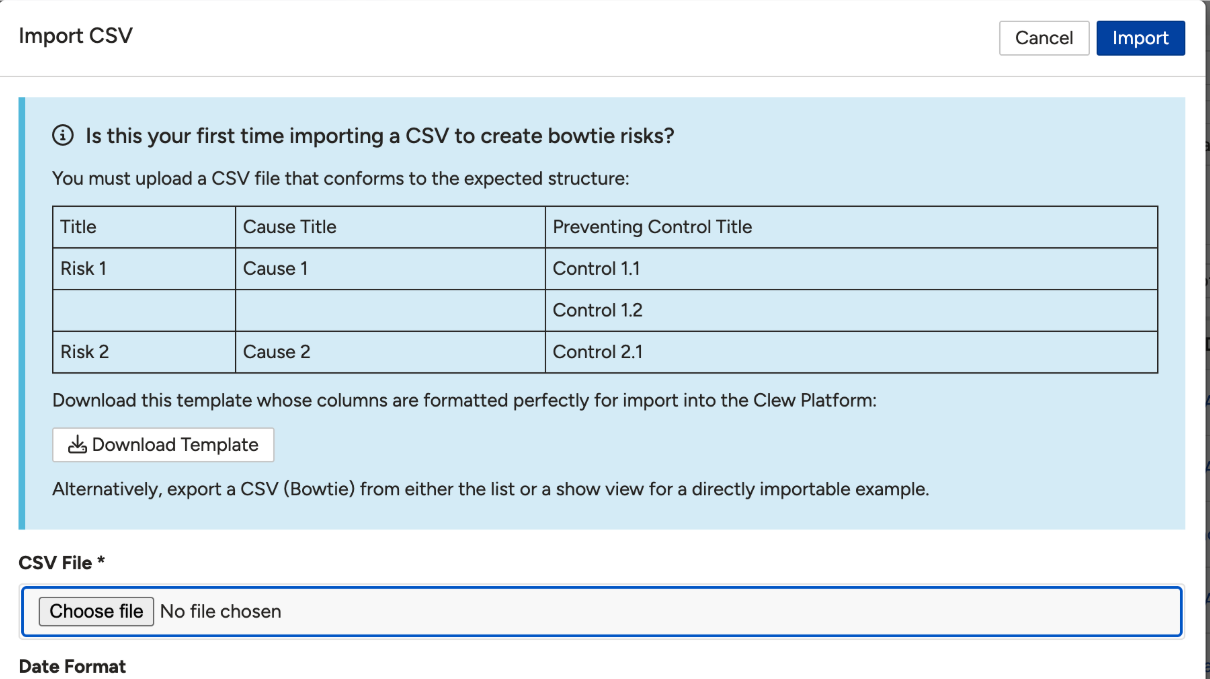
The Import CSV window, showing the expected structure and the Download Template option.
- In the Import CSV window, choose your file under CSV File and set the Date Format if needed.
- Click Import.
- Test on a small set of records first. If duplicate controls are created, use control de-duplication to merge them.
Click a title to preview it here. Use the Open full article button to read the full version in a new tab.
▾CSV Imports Open full article »
Related article
The standard CSV import process, including how to format your file.
▾Risks: Simple & Bow Tie Open full article »
Related article
How causes and controls fit together in simple and bowtie risks.
Was this article helpful?
That’s Great!
Thank you for your feedback
Sorry! We couldn't be helpful
Thank you for your feedback
Feedback sent
We appreciate your effort and will try to fix the article