Can I change the order of the consequence categories of a risk matrix?
Each Risk Matrix can include multiple consequence categories, which are fully customisable. The order of these categories can be adjusted by a System Administrator.
For more information, refer to the article Risk Matrices.
Important Notes
Only System Administrator can change the order of consequence categories.
Changes take effect immediately after saving and apply to all users who use the risk matrix.
How to change the order of the consequence categories?
Go to Admin > Risk Matrices.
Select the risk matrix you want to edit.
On the left-hand side, locate the Consequence Categories.
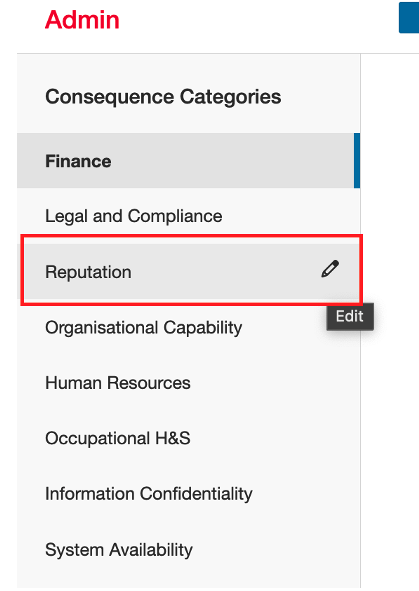
Hover over the category you want to reorder and click the pencil (edit) icon.
Update the order number to the desired value.
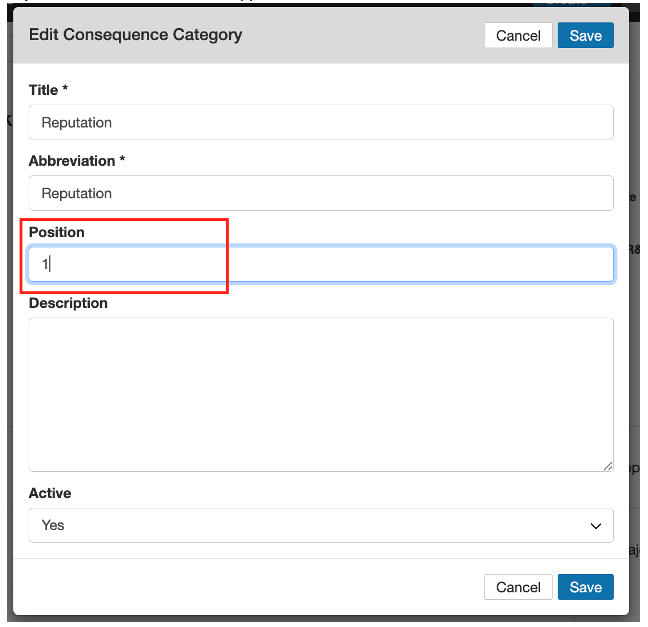
Save your changes.
Was this article helpful?
That’s Great!
Thank you for your feedback
Sorry! We couldn't be helpful
Thank you for your feedback
Feedback sent
We appreciate your effort and will try to fix the article