TABLE OF CONTENTS
Context
When creating or updating a schema, some fields may not hide or display immediately. If this happens, try the following steps:
Field not appearing in Schema
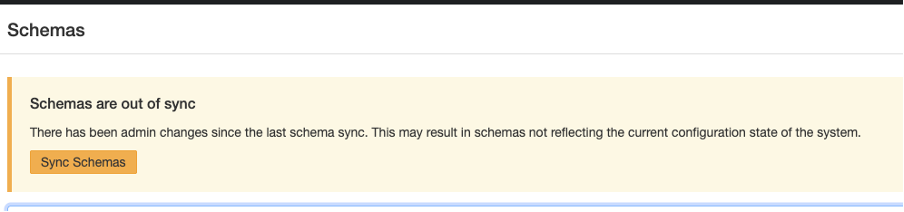
If you’ve just created a new field and it doesn’t show up in the schema:
- Go to Admin > Schemas.
- Click Sync Schemas.
- Return to your schema, the field should now be visible.
Field on Custom Type not enabled for New or Edit Form
If you have synced the schema and the field doesn’t appear, check the relevant Custom Type if the field has been enabled for the forms, as well as it needs to be generally enabled.
- Go to Admin > Custom Types
- Select the relevant Custom Type
- Check the visibility for your field
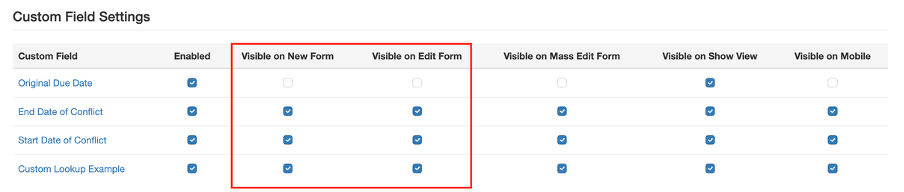
Tip: Field visibility is managed per Custom Type. Check the other Custom Types to ensure your schema is linked to the correct one.
Field visible in Schema but not appearing on the Form
If a field exists, but isn’t visible:
- Go to Admin > Schemas.
- Search for the relevant Schema and open it.
- Locate the field on the Schema.
- On the right-hand side, check the eye icon to ensure the field is set to visible.

Field marked as visible, but still not appearing on the form
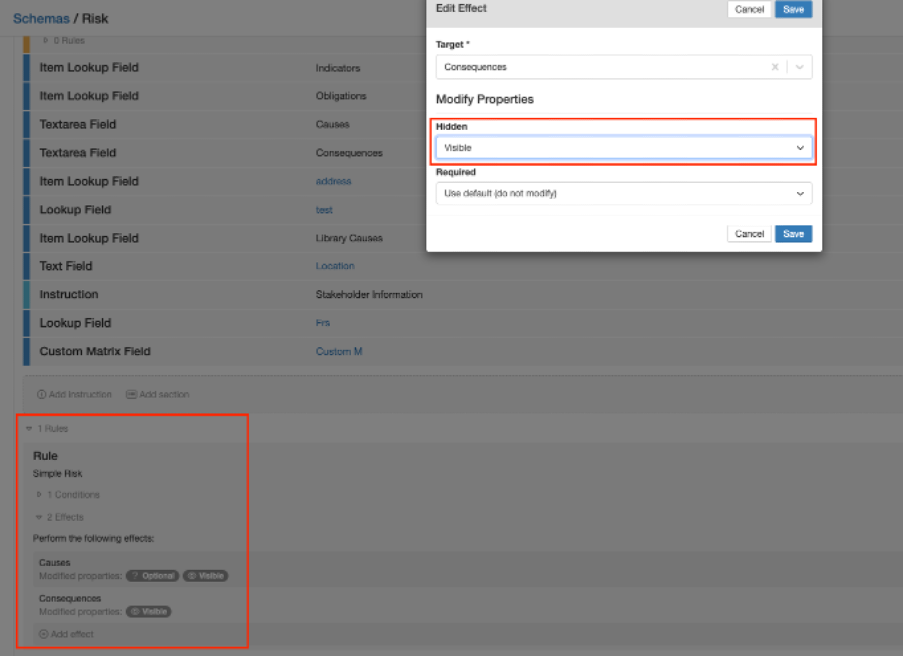
If the field is correctly marked as visible or hidden but the change doesn’t reflect:
- Open the schema and review its configuration.
- Confirm the field’s visibility setting aligns with your intent (visible/ not visible).
- Check for any rules applied that may override the visibility (e.g., conditional display logic).
Field hidden on Module
If none of the above steps resolve the issue, please contact CGR Support.
In rare cases, core fields may be hidden across the entire module, this setting can only be adjusted by CGR. Reach out to support@corpgovrisk.com for assistance.
Was this article helpful?
That’s Great!
Thank you for your feedback
Sorry! We couldn't be helpful
Thank you for your feedback
Feedback sent
We appreciate your effort and will try to fix the article